Currently, Auto-Align Post does not support aligning embedded AAF files in DaVinci Resolve.
An embedded AAF is a single .aaf file that contains the audio media inside it. You can usually tell this is the case if the error message refers to an .aaf file.
Workaround: export your timeline as a non-embedded AAF (with separate audio files), re-import it into DaVinci, and then run Auto-Align Post.
Steps:
Go to the Deliver tab.
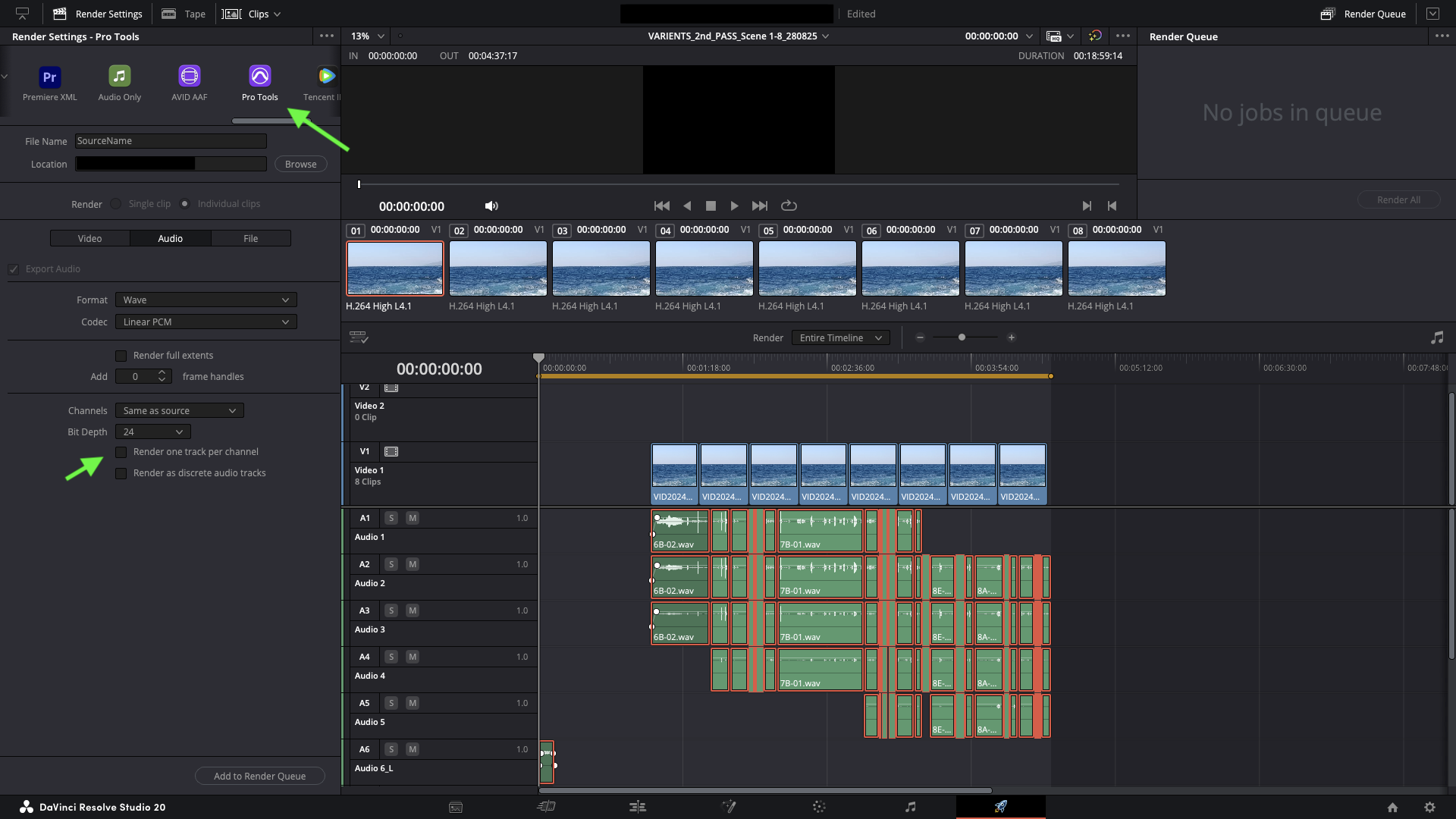
Select the Pro Tools preset.
Set a destination folder for the AAF and audio files.
In the Video tab, uncheck Export Video.
In the Audio tab, review the settings (disable Render one track per channel if needed).
Add to the Render Queue and click Render All.
Import the newly created AAF via File → Import → Timeline.
Once imported, Auto-Align Post should work as expected.
If you encounter any issues, please send us a message to support@soundradix.com.
Was this article helpful?
That’s Great!
Thank you for your feedback
Sorry! We couldn't be helpful
Thank you for your feedback
Feedback sent
We appreciate your effort and will try to fix the article